Digital risk: your attack surface does not end at your perimeter
A domain that mimics yours, an employee's credentials up for sale, a campaign using your brand to defraud your customers: none of it lives on your servers, and all of it can end up as your incident. This pack watches the outside and warns you before it is too late.
Three fronts, one panel
- Brand protection
Impersonation and defacement
Detection of domains and profiles that mimic your brand, and of unauthorised changes to your websites (defacement). With the evidence ready to request a takedown.
Brand protection - Dark web
Leaks and credentials
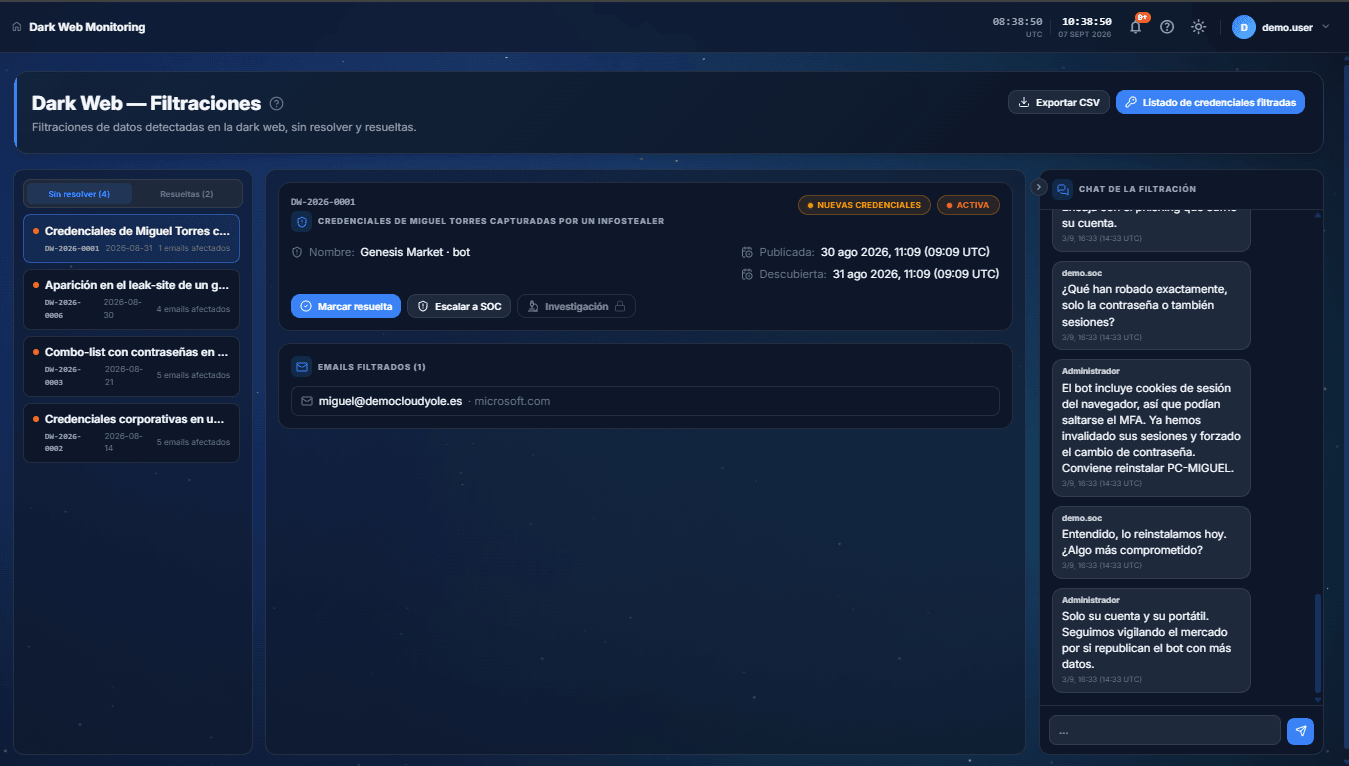
Monitoring of the markets and forums where your organisation's leaked data and credentials show up. You know what has been exposed and whose it is, so you can force the change before it gets used.
Dark web monitoring - Intelligence
Threats that matter to you
Threat intelligence filtered by what actually affects you: your sector and your geography. Less noise, more actionable signal.
The difference is the correlation
A standalone monitoring service sends you a notice: «credential for juan@yourcompany leaked». Fine. But does Juan have access to the ERP? Is his computer in the inventory? Is there an open incident on that same computer? In Cloud Fortress that leaked credential lands on the real person and the real asset, and gets cross-referenced with everything else. The notice stops being a notification and becomes the start of a response.
Detection happens outside; decisions happen inside. Here both happen in the same place.
Related capabilities
Frequently asked questions
Do you handle the takedowns yourselves?
We gather the evidence and hand you the case ready to request removal. The exact scope of the service is something we agree in the demo.
How often is the dark web monitored?
It is continuous monitoring; when something of yours shows up, it becomes an alert with context inside the platform.
What do I need to configure to start monitoring?
Almost nothing: you add the organisation's domain and the monitoring service does the rest. For detecting unauthorised changes to your websites you add the domain or URL from the panel, and the probe takes it from there.
What is shown of a leaked credential?
What you need to know is whose the account is, what it gives access to and how long it has been exposed. That is enough to force the change and review the activity on that asset.
Can I give marketing access without letting them touch the process?
Yes, and it is the usual setup. Marketing comes in with view-only access: they see which impersonations are active and how each takedown is going, without being able to change the case. On website change detection they are, in fact, the profile that contributes most to triage: they are the ones who know whether a change was theirs.
Loading the form…
Controller: Cloud y Olé S.L. Purpose: emailing you the dossier and, only if you tick the box, marketing communications. Rights: access, rectification, erasure, objection and the other GDPR rights, by writing to contacto@cloudfortress.es. More information in the privacy policy.